Rayvin Client Tools
Quick reference for the utility windows included in the Rayvin client and the correct way to open and use each one.
Overview / How It Works
What It Is
A set of client windows built into the Rayvin client: the Bank, the Token Shop, Player Settings, Prey, Boss Cooldowns, the Guild Manager, the Player Market, Waypoints, and the Gem Converter. Each window mirrors a server system.
How It Works
Top-menu tools open from their HUD button anywhere. Discover waypoints on their map tiles, then open travel there or through Warp Rune > Waypoints. Use the Gem Converter object to open its window. The windows show current balances, requirements, and available actions.
The Bank
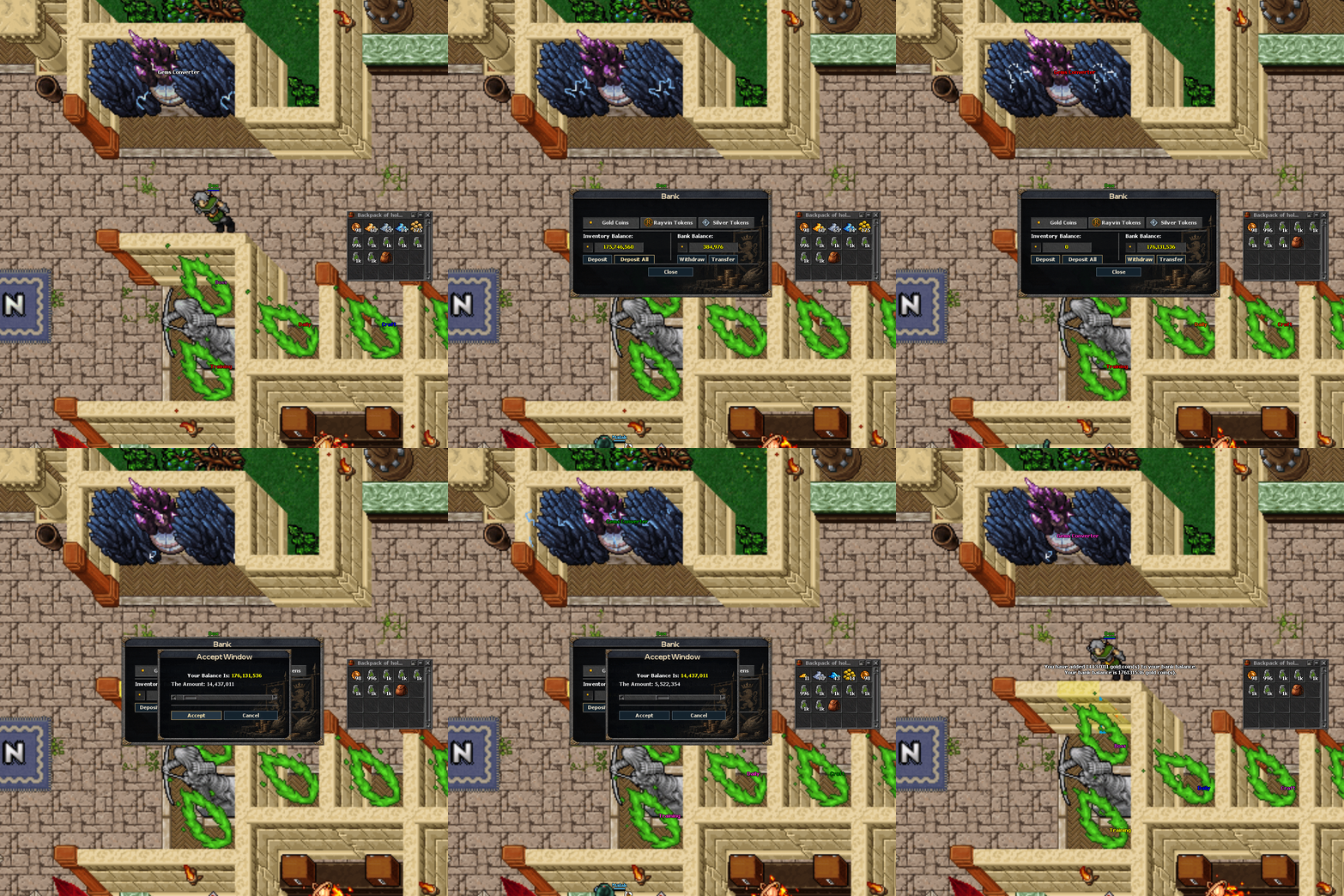
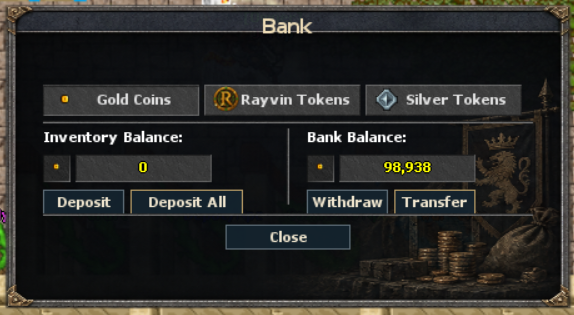
Three currencies — gold, Rayvin tokens, and silver tokens — can be deposited, withdrawn, transferred to another player, or deposited all at once. Use the Bank window to manage these currencies; it is unavailable during events. Banked gold is used for house rent and market purchases. See the Rayvin & Silver Tokens section of this guide for bank rules and every token use.
Waypoints
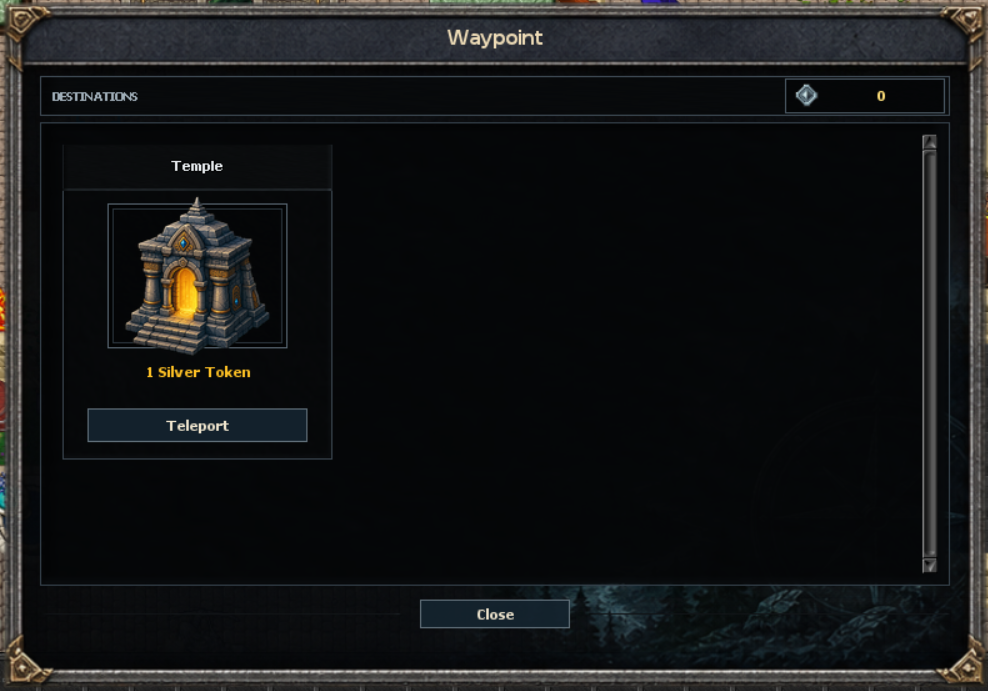
Step on a waypoint tile to discover it. The Waypoints window then lists your unlocked destinations with their silver-token cost, and one click warps you there. Waypoint travel is blocked while in combat. Warp Rune offers Saved Position and Waypoints. Temple travel has a five-minute cooldown; waypoint travel has a two-second cooldown outside protection zones; inside a protection zone, that cooldown is skipped.
Everyday Tools
Bank
Manage gold, Rayvin tokens, and silver tokens. Deposit, withdraw, transfer to another player, and review the selected currency balance.
Open: Bank top buttonStore & 24-Hour Shop
Open the Store to browse offers paid with store coins. When a 24-Hour Shop is active, it opens by default and shows one shared countdown for all its offers. The category and its offers disappear when that shop window ends; otherwise the Store opens its usual categories. Cosmetic offers can include a configured Talent Point reward: check the offer details before buying.
Open: Store buttonPlayer Market
Create buy-now offers of up to 1,000 items from one selected stack, or single-item auctions. Search listings and review My Offers and Trade history. Trade using banked gold, account Premium Points, or banked Rayvin Tokens. Deposit carried gold and tokens before buying; there are no market fees.
Open: Market top button; Ctrl + right-click a backpack item → Add MarketToken Shop
Browse the current server-provided shop categories, review item prices, select an amount for stackable goods, and confirm purchases.
Open: Token Shop top buttonPlayer Settings
Choose which Announcements, Help, Death, Pets, Loot, Auto Loot, and Reward Chest channels open on login. You can also control combat and display effects.
Open: Player Settings top buttonLow Graphics Mode
For a slower graphics card, enable this option to switch off dynamic map lighting, item-rarity shader effects, and character-name shader effects. It is off by default and saved in your client settings. Log out and back in after changing it for the full effect. Item rarity, statistics, and bonuses stay unchanged.
Open: Options > Graphics > Low graphics modeInspect
Inspect another player's equipment, upgrades, charms, skills, progression details, and other available character information.
Use: client inspect actionWaypoints
Discover a waypoint by stepping onto its map tile. The window lists your unlocked destinations, shows any silver-token cost, and closes when you leave the tile.
Open: discovered waypoint tile or Warp Rune > WaypointsGem Converter
Use the converter inside its dedicated area to upgrade or downgrade gem-stone tiers. The interface shows your live balance and maximum available conversions, and closes when you leave the converter area.
Open: use the Gem Converter objectRayvin & Silver Tokens
Rayvin Tokens
Spend them at Merchant, buy Prey wildcards, advance pets, transfer equipment upgrades, craft special items, fund item bounties, and trade in the player market.
Silver Tokens
Spend them on Stage advancement, Revive charges, waypoint travel, NPC missions and access, player bounties, the Room of Souls, and Owl Keeper crafting. Certain boss gates only require you to carry them.
Bank
Deposit, withdraw, deposit all, or transfer either currency. Transfers use your bank balance, require you to stand in a protection zone, and require the recipient to be online. Banking is unavailable during events.
Open: Bank top buttonRayvin Token Uses
| Use | Cost | How to Use / Requirements |
|---|---|---|
| Merchant shop | See the catalogue below. | Say hi, then trade. Accepts carried and banked Rayvin Tokens. The shop may be labelled Silver Merchant, but these offers charge Rayvin Tokens. |
| Prey wildcards | 1 Rayvin Token + 1,000,000 gold per wildcard. | At Prey Card Dealer, say hi, trade, choose 1, 10, 50, or 100, then yes. Accepts carried and banked currency. Prey bonuses apply to eligible normal monsters; bosses and quest monsters are excluded. |
| Pet levels | Current pet level 100–299: 5 Rayvin Tokens + 2,000,000 gold per level. Current pet level 300–599: 10 Rayvin Tokens + 4,000,000 gold per level. | Open the Pet System with !pet and choose Advance. Requires player level 300+, an unlocked pet system, and a living summoned pet. Paid advancement starts at pet level 100 and stops at 600; unavailable in dungeons. Accepts carried and banked currency. |
| Upgrade transfer | 30 Rayvin Tokens + 30,000,000 gold per attempt. | Use !upgradetransfer. Carry the tokens; banked tokens are not used. Fully upgraded source and unupgraded target must be the same equipment type, with the target exactly one tier higher. Success chance is 70%; failure consumes payment and leaves both items unchanged. |
| Player market | Price set by the offer creator. | Open Market from its top-menu button and select Rayvin Tokens. Payments and proceeds use your banked Rayvin Token balance; deposit carried tokens first. The market also supports banked gold, displayed in Gold Nuggets at 1 nugget = 1,000,000 gold, and account Premium Points. There are no listing or transaction fees. See the Player Market guide for auctions and delivery rules. |
| Fatal Stone crafting | 10 Rayvin Tokens + 40,000,000 gold, 5 Blood Crystals, 2 Pieces of Draconian Steel, and 2 Flawless Ice Crystals. | Crafting Forge: player level 320, crafting mastery 25. Tokens and materials must be in your backpack. |
| Mana Cost Reduction Crystal crafting | 2 Rayvin Tokens + 30,000,000 gold, 1 Flawless Ice Crystal, 2 Iced Soil, and 2 Neutral Matter. | Crafting Forge: player level 250, crafting mastery 20. Tokens and materials must be in your backpack. |
| Charm Bag Slots crafting | 10 Rayvin Tokens + 50,000,000 gold, 5 Strange Green Powder, 5 Pieces of Hell Steel, and 5 Huge Chunks of Crude Iron. | Crafting Forge: player level 200, crafting mastery 13. Tokens and materials must be in your backpack. |
| Goldfang item bounty | A reward of 1–10,000 Rayvin Tokens, chosen by you. | Say hi, hunted, the target's exact name, items, item ID 47054, then the amount. Carried tokens are charged immediately. The target must be online and level 200+; you cannot target yourself, staff, or someone already hunted. |
Fatal Stone, Mana Cost Reduction Crystal, and Charm Bag Slots crafting have no material-waste failure. A successful craft consumes the listed backpack ingredients and gold. The 10% per-material waste rolls now apply only to the affected melting recipes; see the Craft System page for their success chances.
Merchant: Rayvin Token Catalogue
| Item | Rayvin Tokens Each |
|---|---|
| Rayvin Mana Rune / Rayvin Healing Rune / Rayvin Spirit Rune | 400 each |
| Stamina Refiller | 30 |
| Roll Potion | 20 |
| Remove Upgraded Gem | 3 |
| Promotion Scroll | 100 |
| Magic Potion | 10 |
| Reflect Gem / Collector Gem / Clock Gem / Block Gem | 2 each |
| Jaul's Pearl | 1 |
| Seal of Quality | 300 |
| Epic Outfits Doll / Epic Mounts Doll | 24 each |
Silver Token Services & Access
| Use | Cost | How to Use / Requirements |
|---|---|---|
| Stage advancement | 200 × next Stage, capped at 1,000 Silver Tokens per advancement. | Deposit the tokens into your Silver Token bank balance. Use !stage to check requirements, then visit [Stage] Mortada and say stage, then yes. Requires the listed level and Stage Boss Points, plus Boss Gate rank A (140 points). Tokens are consumed; no Skull Points are needed. See the Stage requirements table. |
| Mosad: Revive | 30 Silver Tokens + 2,000,000 gold per charge. | Level 300+. Say hi, buy, then yes. Accepts carried and banked currency. Maximum 6 purchases per day, 30 minutes between purchases, and only one unused active charge at a time. |
| Waypoint travel | 1 Silver Token: Temple, Nud Titan, Gaffir, The Devil, Gladiator, Jungle Beast, Jungle Warrior, Batcat. 2 Silver Tokens: Flamescourge, Silk Reaper, Earth Elemental, Sirocco. Free: Pirates Island. | Discover the destination first, then use a waypoint or Warp Rune > Waypoints. Travel requires being out of combat. The 2-second cooldown applies outside protection zones and is skipped inside them. Accepts carried and banked tokens. Discovery itself is free. |
| Mud Titan access | 50 Silver Tokens, paid once. | Carry the tokens and use the entrance to unlock permanent access for that character. The old level and reputation checks have been removed. The arena still permits only one character from the same IP or device at a time. |
| Goldfang bounty | A reward of 1–10,000 Silver Tokens, chosen by you. | Say hi, hunted, the exact target name, silver tokens, then the amount. Carried tokens are charged immediately. Target must be online and level 200+; self, staff, and already-hunted targets are excluded. |
| Room of Souls | 10 Silver Tokens + 10 Skull Points per entry attempt. | Level 300+; 4-hour entry cooldown. Carry the tokens. Payment is currently deducted before room availability is checked, so an unavailable room can still cost tokens. |
| Owl Keeper outfit | 10 Silver Tokens + 15,000,000 gold + 50 Raid Tokens. | Crafting Forge, player level 250+, no crafting mastery minimum. Backpack ingredients required. Unlocks the full outfit and grants 2 talent points; available once while you do not own the outfit. This recipe has no material-waste failure. |
| Gaz, Omrafir, Golden Champion, Elite Akrabuut gates | Carry 2 Silver Tokens + 10 Gold Nuggets. | Level 300+, subject to the arena's same-IP or same-PC restriction. These gates check possession and do not consume the tokens or nuggets. This is an access requirement, not an entrance fee. |
Silver Token NPC Missions
Carry the Silver Tokens and other hand-in items. Complete the NPC's current mission stage before handing them in. Collection missions are completed once per character; the repeatable services are marked below.
| NPC | Silver Tokens & Other Requirements | Result / Important Details |
|---|---|---|
| Ortega | 100 Silver Tokens + 100 Ground Reeds. | Gryphon mount and 2 talent points. Say hi, then yes to start; greet again with the materials. |
| Elghamry | Stage 1: 100 Silver Tokens. Later earn 300 Blood Priest kill credits, then bring 1 Cobra Hood. | Initial payment unlocks the base Brotherhood outfit and 1 talent point. Later stages unlock both addons and award 4 more points, for 5 in total. The first payment alone does not unlock a boss. |
| Joe Sandman | 10 Silver Tokens adds 1 hour of Midnight Panther hunting protection. | Repeatable. Say hi, then yes. You may renew when less than 1 hour of protection remains. |
| Sero | 40 Silver Tokens per Gorvax permit. | Speak to Sero in the Necrotic Lich hunting area: hi, then a quantity from 1 to 10. The numeric reply immediately buys the permits. Accepts carried and banked tokens. Each entry consumes one permit and gives up to 10 minutes in the quest rooms. See Yahya’s quest and Gorvax access. |
| Osman | 15 Silver Tokens per Ashee entry. | Repeatable. Say hi, then a quantity from 1 to 10; one stored entry is used when entering Ashee. His greeting blocks further purchases when you already hold 10 or more entries. |
Upgrade Transfer
Source
The source must be a movable, tiered equipment item that is fully upgraded for its tier.
Target
The target must be an unupgraded item exactly one tier higher, of the same equipment type. Both items must remain in an open backpack.
Success
The source is cleaned of its upgrade and the target becomes fully upgraded to the maximum level allowed by its own tier.
Open: !upgradetransferGem Conversion Ratios
| Direction | Tier Steps |
|---|---|
| Upgrade | 8 Tier 1 → 1 Tier 2; 6 Tier 2 → 1 Tier 3; 4 Tier 3 → 1 Tier 4; 4 Tier 4 → 1 Tier 5; 3 Tier 5 → 1 Tier 6; 2 Tier 6 → 1 Tier 7. |
| Downgrade | Each higher-tier stone returns the same configured ratio of the immediately lower tier: 8, 6, 4, 4, 3, then 2. |
Player Settings Details
Display
Hide magic effects, hide distance effects, show spell text, and show hotkey messages.
Combat
Show detailed damage, display floating percentages, and show health and mana as percentages.
Character
Control eligible automatic revival. Changing the Revive System setting starts a one-hour setting lock. Fishing Bosses controls whether fishing can summon bosses; change it only while inside a fishing room with valid room access.